> For the complete documentation index, see [llms.txt](https://igb.mit.edu/llms.txt). Markdown versions of documentation pages are available by appending `.md` to page URLs; this page is available as [Markdown](https://igb.mit.edu/mini-courses/python/data-processing-with-python/pandas/slicing-dataframes.md).

# Slicing DataFrames

You can access subsets of your dataframe (views) in a few different ways, but we will focus on two here.

Name-based indexing

```
You provide a row_index and a column_index - they can be slices or lists or whatever to the .loc[row_names, col_names] indexer
example: [your_dataframe_name].loc[my_row_names, my col_names].
```

Index-based indexing

```
You provide the row and column numbers to the .iloc[row_numbers, col_numbers] 
example: [your_dataframe_name].iloc[my_row_numbers, my col_numbers]
```

```
ms.loc[:,'Protein Name'] #get all row (:), 'Protein Name' column
```

<figure><img src="https://498238201-files.gitbook.io/~/files/v0/b/gitbook-x-prod.appspot.com/o/spaces%2FWuHhstIreJ3jFvE4gQ3y%2Fuploads%2F7wh9RacK9OI846IjbMv8%2Fimage.png?alt=media&amp;token=57f382c9-b6fa-44c3-bd8b-45926b63d2a7" alt=""><figcaption></figcaption></figure>

```
#How would you get the first 10 rows using .loc (note that here the row "names" are just numbers
```

```
ms.loc[:9, 'Protein Name']
```

<figure><img src="https://498238201-files.gitbook.io/~/files/v0/b/gitbook-x-prod.appspot.com/o/spaces%2FWuHhstIreJ3jFvE4gQ3y%2Fuploads%2FYpQetzt1qyKQBBG68x4D%2Fimage.png?alt=media&amp;token=886e8bab-b15c-40f0-869b-e24b8146c2f7" alt=""><figcaption></figcaption></figure>

```
ms.loc[0:10,['Protein Name', 'Protein Gene']] #what will this return?
```

<figure><img src="https://498238201-files.gitbook.io/~/files/v0/b/gitbook-x-prod.appspot.com/o/spaces%2FWuHhstIreJ3jFvE4gQ3y%2Fuploads%2F64cZ8O8SchROMrYYwCff%2Fimage.png?alt=media&amp;token=7b88e068-0f9d-46b6-be70-663f2f1543b0" alt=""><figcaption></figcaption></figure>

```
# Note that you can pass any list of column names to the column indexer
ms.loc[:8,[col for col in ms.columns if "Protein" in col]] #what is this doing?
```

Side topic: get familiar with \[[List Comprehension](https://www.w3schools.com/python/python_lists_comprehension.asp)]

<figure><img src="https://498238201-files.gitbook.io/~/files/v0/b/gitbook-x-prod.appspot.com/o/spaces%2FWuHhstIreJ3jFvE4gQ3y%2Fuploads%2FAvBaUXVFwzPF71m2hWrf%2Fimage.png?alt=media&amp;token=703a61a3-01d8-43cc-8ac0-6c72f14b38dd" alt=""><figcaption></figcaption></figure>

```
my_list =[ ]
for col in ms.columns:
    if "Protein" in col:
        my_list.append(col)
```

```
my_list
```

\['Protein Name', 'Protein Preferred Name', 'Protein Gene']

```
my_list = [col for col in ms.columns if "Protein" in col]
```

```
my_list
```

\['Protein Name', 'Protein Preferred Name', 'Protein Gene']

```
ms.loc[:5,my_list] #what is this doing?
```

<figure><img src="https://498238201-files.gitbook.io/~/files/v0/b/gitbook-x-prod.appspot.com/o/spaces%2FWuHhstIreJ3jFvE4gQ3y%2Fuploads%2FoDSadLsuGgv1NRUzXLrZ%2Fimage.png?alt=media&amp;token=073c199f-b949-4e02-8583-5b993f122e85" alt=""><figcaption></figcaption></figure>

```
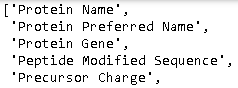
list(ms.columns) #this provides the full list of the columns in the dataframe
```

<figure><img src="https://498238201-files.gitbook.io/~/files/v0/b/gitbook-x-prod.appspot.com/o/spaces%2FWuHhstIreJ3jFvE4gQ3y%2Fuploads%2FpA3B8RdJvuADLitk7ui3%2Fimage.png?alt=media&amp;token=fd9329e1-30fb-4f95-b8a4-d140692c12c6" alt=""><figcaption></figcaption></figure>

<figure><img src="https://498238201-files.gitbook.io/~/files/v0/b/gitbook-x-prod.appspot.com/o/spaces%2FWuHhstIreJ3jFvE4gQ3y%2Fuploads%2FqF0iPt6KERHIzzcbJejZ%2Fimage.png?alt=media&amp;token=1a4b4378-17e3-40ee-9083-0850e0b0eca0" alt=""><figcaption></figcaption></figure>

```
# write a line to access all columns related to sample BT2_HFX_6
ms.loc[:,[col for col in ms.columns if "BT2_HFX_6" in col]]
```

<figure><img src="https://498238201-files.gitbook.io/~/files/v0/b/gitbook-x-prod.appspot.com/o/spaces%2FWuHhstIreJ3jFvE4gQ3y%2Fuploads%2FJ3xH9g86AGJeP1UysggK%2Fimage.png?alt=media&amp;token=ed8c78ee-aee9-4707-bbb5-e9417af5df1b" alt=""><figcaption></figcaption></figure>

```
# Now let's try indexing with .iloc
ms.iloc[:5,3:9] #note the difference in how iloc and loc work!>
```

<figure><img src="https://498238201-files.gitbook.io/~/files/v0/b/gitbook-x-prod.appspot.com/o/spaces%2FWuHhstIreJ3jFvE4gQ3y%2Fuploads%2Fe6EsUCb9rTiko2N6QAeE%2Fimage.png?alt=media&amp;token=d334c964-d196-41e8-9e1a-9684dd415013" alt=""><figcaption></figcaption></figure>

```
ms.iloc[:20,'Precursor Charge'] #Will this work?
```

<figure><img src="https://498238201-files.gitbook.io/~/files/v0/b/gitbook-x-prod.appspot.com/o/spaces%2FWuHhstIreJ3jFvE4gQ3y%2Fuploads%2FheEZieOXAzvCv2skosOF%2Fimage.png?alt=media&amp;token=d8eccbdd-3283-4957-82e9-8590211fd8cc" alt=""><figcaption></figcaption></figure>

```
ms.iloc[:20,4]
```

<figure><img src="https://498238201-files.gitbook.io/~/files/v0/b/gitbook-x-prod.appspot.com/o/spaces%2FWuHhstIreJ3jFvE4gQ3y%2Fuploads%2FdisvbrIM66hkNLyLCNgg%2Fimage.png?alt=media&amp;token=dbf56bfd-0e08-4ffc-b5b7-55199d34fa38" alt=""><figcaption></figcaption></figure>